Windows

Dread Drumz
The Ultimate Drums for Reggae and Dub Music. From authentic vintage sounds to creative modern vibes.
Make something new with Dread Drumz.
Dread Drumz is your go-to for all things roots, dub, and reggae drums.
Whether you're after that classic reggae feel or something with a modern twist, this plugin’s got you covered with a massive library of kits and samples.
Mix and match, tweak, distort, and create your perfect drum sound with the built-in effects racks.
Need some groove ideas? Dive into our huge MIDI loop collection with everything from intros to breakdowns. Dread Drumz makes it easy to craft killer rhythms for your next track.
Whether you're after that classic reggae feel or something with a modern twist, this plugin’s got you covered with a massive library of kits and samples.
Mix and match, tweak, distort, and create your perfect drum sound with the built-in effects racks.
Need some groove ideas? Dive into our huge MIDI loop collection with everything from intros to breakdowns. Dread Drumz makes it easy to craft killer rhythms for your next track.

Videos
Audio
Dread Drumz Demo 1 Mix
Dread Drumz Demo 2 Mix
Dread Drumz Demo 3 Mix
Dread Drumz Demo 4 Mix


What's inside ?
Dread Drumz features authentic acoustic drum kits, meticulously recorded in a professional studio in the south of France by Karigan, an exceptional reggae drummer.
Together, we captured the essence of reggae's iconic eras—from the early '60s to today—bringing you the unmistakable sounds of Rocksteady, One-Drop, Rub-a-Dub, and New Roots.
In addition, the plugin offers custom-built kits designed for a wide range of reggae-related genres, including Dub, Dancehall, DubHop, Electro Dub, Afrobeat, and more.
You can even blend sounds across each channel, giving you ultimate flexibility and creative control over your drum tracks.
The plugin also allows you to output each channel into separate tracks into your DAW for further processing.
Together, we captured the essence of reggae's iconic eras—from the early '60s to today—bringing you the unmistakable sounds of Rocksteady, One-Drop, Rub-a-Dub, and New Roots.
In addition, the plugin offers custom-built kits designed for a wide range of reggae-related genres, including Dub, Dancehall, DubHop, Electro Dub, Afrobeat, and more.
You can even blend sounds across each channel, giving you ultimate flexibility and creative control over your drum tracks.
The plugin also allows you to output each channel into separate tracks into your DAW for further processing.
You'll have access to an extensive library of MIDI loops that can be played directly within the plugin for easy previewing.
Plus, you'll have the ability to drag and drop loops straight into your DAW's MIDI tracks.
The collection includes a variety of grooves, small fills, accents, intros, breaks, and more—giving you all the building blocks to craft the perfect drum track.
Plus, you'll have the ability to drag and drop loops straight into your DAW's MIDI tracks.
The collection includes a variety of grooves, small fills, accents, intros, breaks, and more—giving you all the building blocks to craft the perfect drum track.
The Ultimate Drums For Reggae and Dub
Authentic Drum Kits
Dread Drumz features several full-sampled drum kits used in Reggae music.
Get classic reggae drum sounds, here are the included kits (and their variations):
- Early 60’s
- One Drop
- Rub-a-dub
- New Roots
Dread Drumz also features many custom-built drum samples suitable for modern productions.
From Electro-Dub, Ragga DanceHall, to Caribbean music, Afro beat, etc…
Full Dub FX Pack
Classic Effects, Modern Workflow
Dread Drumz also features many custom-built effects, available into each channel :
- Different types of Filters
- Saturation & Compression modules
- Tape Delay FX, with unique settings
- 2 Reverb Types (Spring, Plate, Hall, Space…)
Easy to Use interface
Ready for Production
The plugin is build to make things simple for you.
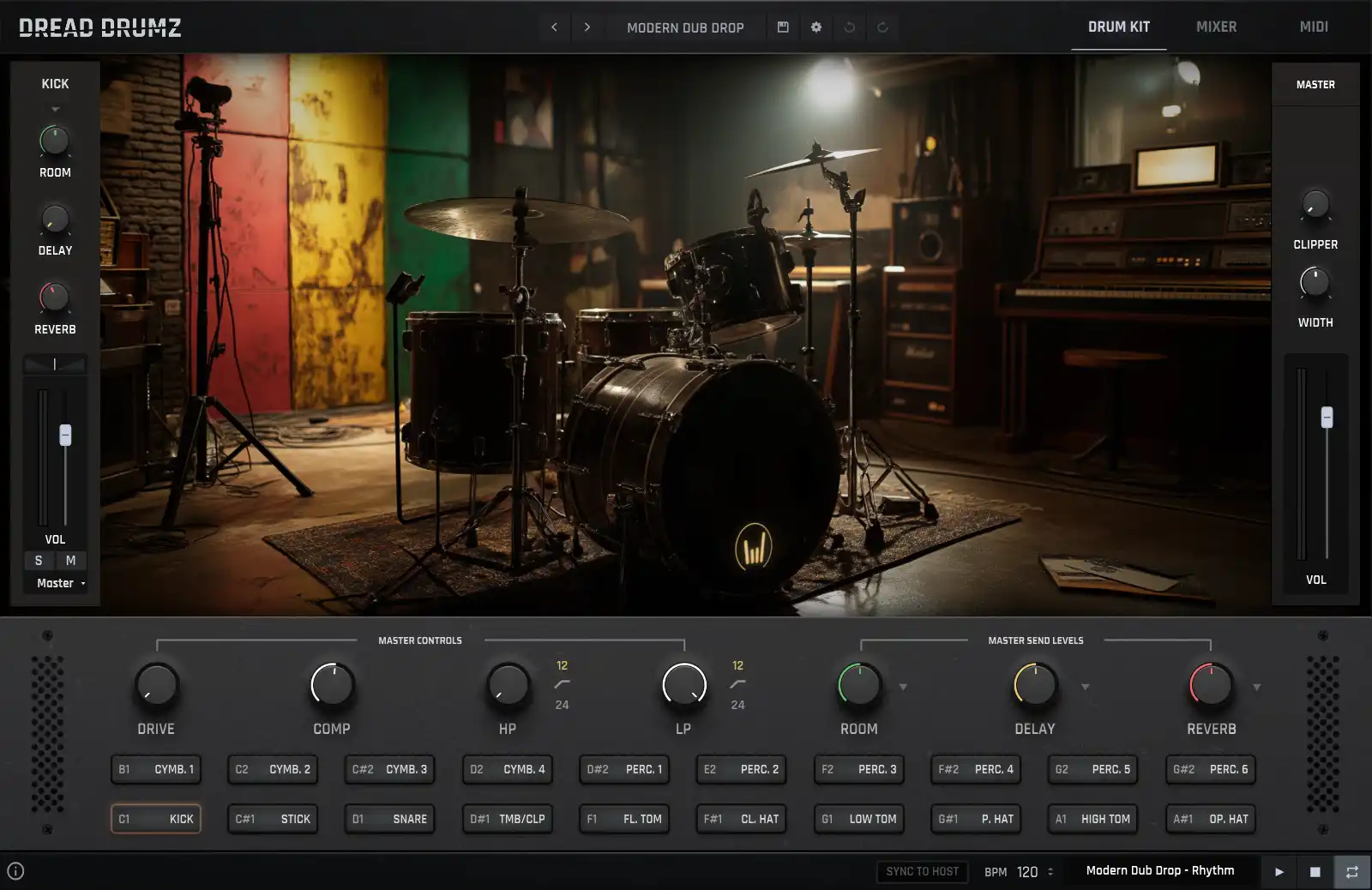
- A single page where you can play drums and tweak the effects right away.
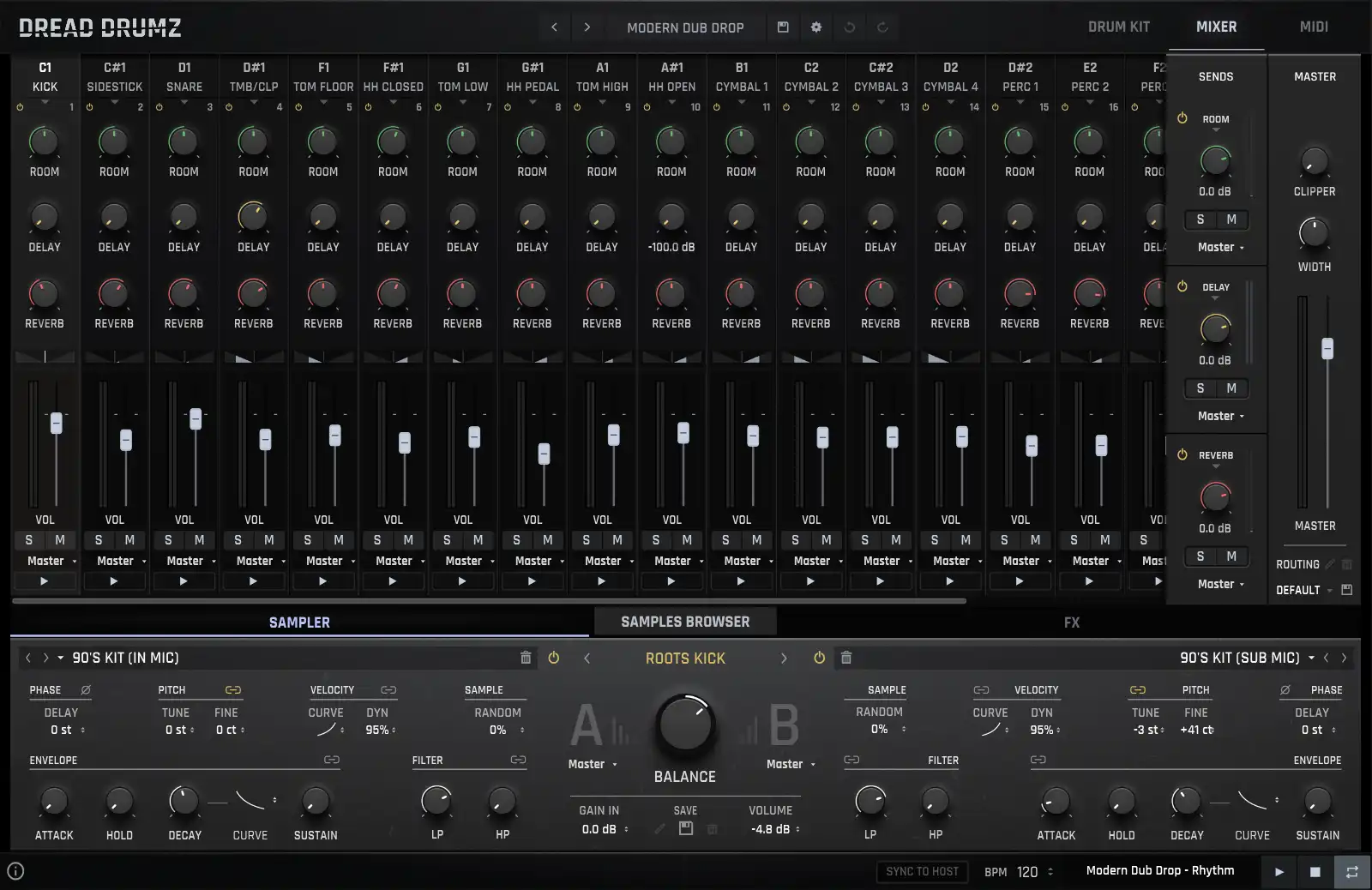
- A Mixer where you’ll have more control over the different drums, Overhead, and Room channels.
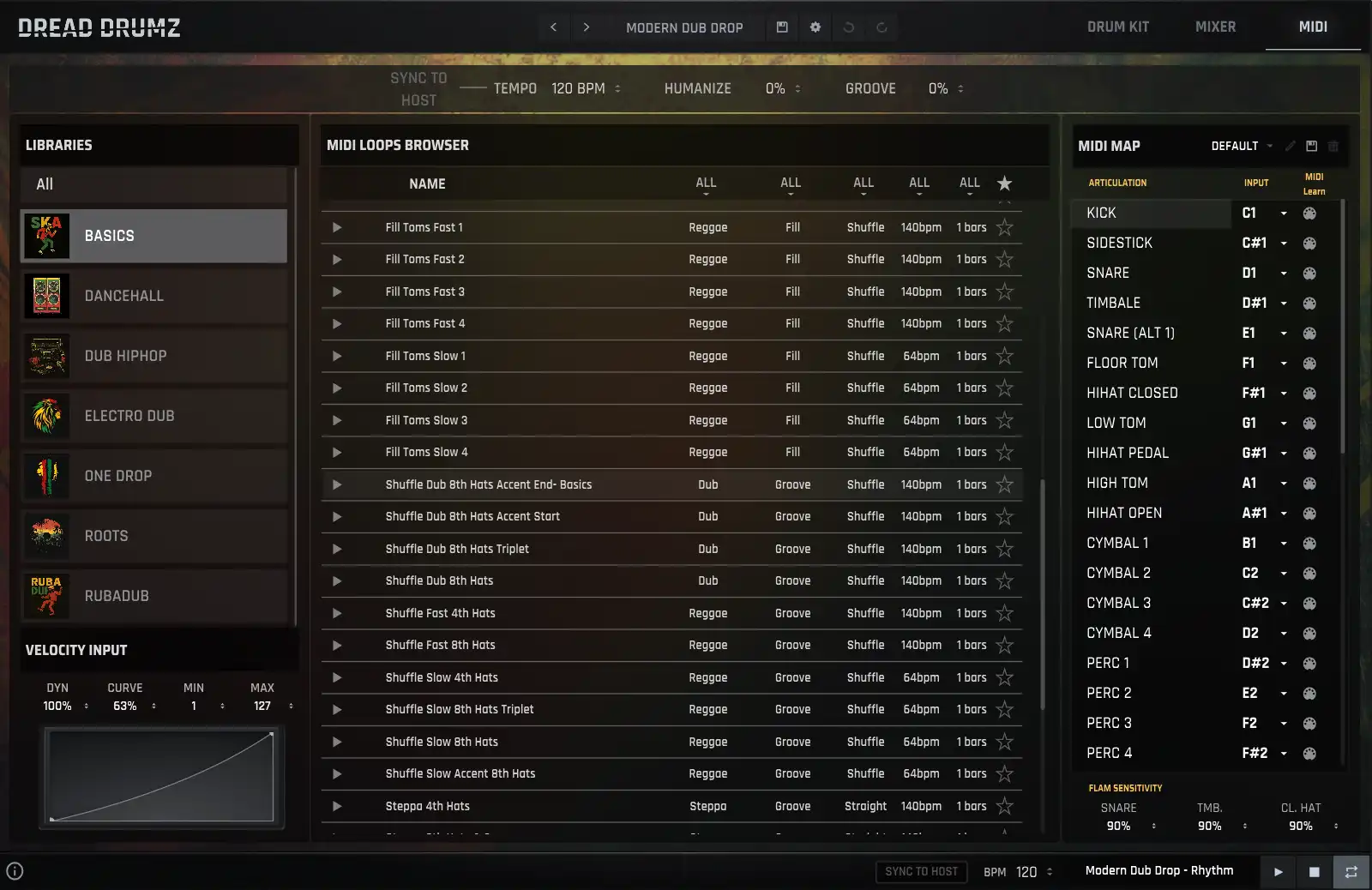
- A comprehensive MIDI loops browser, from where you’ll have access to hundreds of carefully produced MIDI loops.
Don't take our word for it
Hear It from the Pros
From bedroom producers to professional studio wizards, our users share their experiences with the transformational impact of Dread Drumz on their creative process.
Such a great plugin
This is such a great plugin, you have done a great job.
I look forward to the updates to complete the midi loops.
Overall, great sounds and looks great, I'll be recommending to other producers.
I love all the plugins, they have helped make some amazing dub grooves.
Cheers!Dubba Wilks
Dub Producer
Plugin Specifications
- 7000+ drum samples.
- 450+ Drum Sounds.
- 90+ ready-to-use presets.
- 700+ drum channel presets.
- 360 MIDI loops
- Room, Delay, Reverb Send Channels
- 120 FX presets.
- 20 channels Mixer.
- 8 velocity layers and 8 round robins per coustic drum sample.
- Amplitude Envelope controls
- Microphones blend options for Kick and Snare elements
- Custom Classic Effects : Filter, Saturation, Delay Reverb, Compressor.
- External Routing Options.
- Easy-to use interface, Deep possibilities
Changelog
v1.0.6 :
- Added: a few new presets
- Fixed: Minor glitches
v1.0.5 :
- Added: 'DAW Play' switch in the MIDI bar, with a shortcut in the footer - when on, starting the DAW starts the loaded MIDI clip in time with the DAW position, and stopping it stops the clip. Requires Sync To Host; off by default and kept across presets
- Changed: Starting the DAW no longer restarts a clip just because it was played in the plugin before - turn on DAW Play for that
- Changed: Factory kit presets reworked and rebalanced to a new output level; 'Impact Kit' is now 'Nasty Kit' (Hybrid Kits) and 'Impact Full' is now 'The Pact' (Dub Hop Kits)
- Changed: Factory channel and FX presets updated - Room and Reverb presets now include the IR Stretch
- Changed: A new instance now starts on 'Modern Bright Kit'
- Improved: MIDI bar layout, and new look for the Sync To Host and DAW Play buttons
- Improved: Selected mixer channels are now shaded instead of outlined
- Fixed: With Sync to Host on and the DAW playing, a MIDI clip started from the loop start instead of the DAW position, and the plugin did not always take the DAW tempo at launch
- Fixed: With Sync to Host off, loading a kit preset kept the previous MIDI clip's tempo instead of the tempo of the preset's clip
- Fixed: Room and Reverb FX presets did not save the IR Stretch setting
- Fixed: Loading a kit preset left the Room, Delay and Reverb preset menus (and their macro menus) on the previous selection - they now show the kit's FX preset, its category included
v1.0.4 :
- Improved: Lower memory use - about 200 MB less per plugin instance
- Improved: Faster plugin loading
- Fixed: Audio Unit (Logic Pro) - the interface could take more than 30 seconds to open, and kept the CPU busy for a while after it appeared
v1.0.3 :
- Added: 'Edit Output Names' window - Confirm and Cancel buttons. Names only change when you click Confirm; Cancel, or a click outside the window, closes it and leaves everything as it was
- Added: Windows installer - optional AAX plugin (Pro Tools), removal of earlier Dread Drumz installations and of the old, emptied factory preset folders
- Improved: Output names longer than the mixer output menu are shortened with '...' (names of up to 8 characters are always shown whole), and the menu's tooltip shows the full name
- Improved: The text of the About panel follows the chosen interface font
- Fixed: The factory 'Default' routing could be overwritten, or another routing renamed over it - this is now refused with a message
v1.0.2 :
- Improved: Undo / Redo now also steps back through sampler, EQ, drum page, macro and MIDI player changes, and through channel and FX preset loads (history clears when a kit preset loads)
- Fixed: Loading a kit preset left the A/B sampler balance and the disabled samplers of every channel but the selected one as the previous kit had them
- Fixed: The sampler 'Fine' knob always showed 0 after switching channel, and the next 'Tune' move (or a linked one) erased the fine tuning
v1.0.1 :
- Added: Undo / Redo buttons next to Settings - step back through mixer and FX changes (history clears when a preset loads)
- Added: Custom names for the external outputs - the name also shows on the DAW's multi-out tracks (VST3)
- Added: Edit several mixer channels at once - Cmd/Ctrl + click a channel strip to add it to the selection, Shift + click to select a range. Volume, pan, sends, Solo, Mute and output then move together
- Added: 'Multi-channel edit' setting (Controls tab) - selected channels move by the same amount (Relative) or all take the same value (Absolute)
- Added: Cmd/Ctrl + click on a channel's BP button keeps only that channel running (click again to bring every channel back)
- Added: Rename and delete your own channel presets, FX presets, routing setups and MIDI maps
- Added: Choice of interface font in the settings, each available in a normal and a larger size
- Added: Controls tab in the settings - pick the mouse gestures for value entry, fine tune and reset on every knob
- Added: The pad of the selected channel is now outlined on the drums page
- Added: Offline authorization route when the machine ID has changed (new computer, OS reinstall)
- Improved: Lower CPU use - idle reverbs, delay and spectrum analysers now rest when nothing plays
- Improved: Room and Reverb IR 'Stretch' knobs now show the length ratio (x0.5 to x2.0)
- Improved: The Kick can now play more than two overlapping hits
- Improved: The preset browser marks the loaded kit's group and keeps 'Show Favorites' lit while it filters the list
- Improved: Flams follow the kit's velocity curve - the strike sets the level, the following hits fade out smoothly
- Improved: The MIDI loops browser shows the full loop names
- Improved: A machine ID mismatch is now distinguished from a corrupted keyfile
- Changed: OpenGL is no longer used on macOS, and is an opt-in setting on Windows
- Fixed: The Kick could stay silent after reloading a project
- Fixed: The Kick's randomizer had no effect
- Fixed: Output pairs 9 to 24 were silent
- Fixed: Split sampler outputs (Kick, Sidestick, Snare) did not route correctly, or could not reach outputs above pair 8
- Fixed: Sync to Host - tempo followed a stale DAW value, and the loop now stops with the DAW even when Sync to Host is off
- Fixed: The MIDI loops kept following the DAW transport with the plugin window closed
- Fixed: Delay sync times did not match the note value shown on the knob
- Fixed: Dragging a MIDI loop into the DAW exported the selected loop instead of the hovered one, without the active MIDI map
- Fixed: A loop could play the wrong drums after changing the MIDI map
- Fixed: Saving a MIDI map under an existing name could create a duplicate instead of asking to overwrite
- Fixed: A new instance showed one default kit and loaded another
- Fixed: The Samples Browser list did not follow a preset change, and lost the loaded sample's group
- Fixed: Switching a channel off and on with BP re-enabled a sampler you had turned off
- Fixed: Routing setups could not be saved or listed when the routing file was damaged
- Fixed: The mixer channel play button was hidden behind a grey block
- Fixed: Offline authorization - the request file was not written nor displayed
- Fixed: Activation panel layout and drop area
v1.0.0 :
- Added: The MIDI clips transport now follows the DAW transport (host play/stop) when 'Sync to Host' is enabled
- Added: Channel FX filter peak level control
- Changed: 'Sync to Host' is now a global setting instead of being saved in each preset
- Improved: The mixer Solo/Mute has been completely rewritten and the Send FX channels decoupled - soloing a drum no longer kills the reverb/delay tails, and moving a muted channel's fader no longer un-mutes it
- Improved: Faster preset loading - sample maps are now loaded in a single batch
- Fixed: The master Width knob was acting on the Room balance
- Fixed: Split sampler outputs were lost after loading a sample map
- Fixed: Missing peak level values in the channel presets
- Fixed: The Samples Browser could stay open when changing preset from the Preset Browser
- Fixed: Drum pads tooltips
- Misc: Large internal cleanup (dead code and debug traces removed)
v0.9.9f :
- Fixed: The authorization process was broken by the notification system call
- Added: New presets
- Fixed: A GUI glitch occurring in Logic
v0.9.9e :
- Improved: All factory presets re-levelled (volumes and Send FX amounts)
- Changed: IR Room & Reverb levels set to -6dB, Send FX default level set to 0.0dB
- Fixed: Restored the legacy activation flow
- Fixed: Removed a duplicate Room::Kick Enhancer preset
v0.9.9d :
- Added: MIDI settings panel
- Fixed: A crash occurring when changing presets quickly while playing
- Fixed: The Send FX panel was not showing when clicking on the Send FX controls
- Fixed: The sampler enable state was not refreshed when selecting a channel
- Fixed: FX presets writing bug
- Improved: Channel presets volume and pan values have been normalized
v0.9.9c :
- Added: Compressors gain reduction display now works on all platforms
- Improved: Channel & FX preset files are now version-checked before being updated
- Fixed: MIDI drag & drop not working - a default preset is now loaded when opening the plugin
- Fixed: MIDI clips not being sorted, MIDI filter menus, missing MIDI data, Favorite icon not clickable
- Fixed: The 'PHASER MIX' knob was not broadcasting its value
- Fixed: An XML parsing error occurring on load
- Fixed: Channel presets list population, channels output routing, global filters
- Fixed: Samples Browser container bug and menu display glitch
- Improved: Cleaned DSP networks and removed unused files
v0.9.9b :
- Fixed MIDI input glitch
- Attempt to fix MacOS file writing permissions during plugin installation
v0.9.9a :
- Fixed a small delay introduced by the previous audio bug fix
v0.9.9 :
- Fixed an audio burst occurring on some configurations
- The send FX signal handling has been completely rewritten
v0.9.8b :
- Re-sampled a new timbale to replace an old one
- Added another batch of MIDI loops
- Fixed some quirks in some MIDI loops
v0.9.7b :
- Updated Saturation module
- Added some presets and MIDI loops
- Added MIDI packs images
- Updated and cleaned data files
- Fixed tom's channels drive input parameter
- Fixed HHats and Ride naming issue
- Fixed a glitch on the samples tags display
- Fixed Preset Browser display glitch
- Fixed Claps/Timbales/Snares channel tag glitch
v0.9.7a :
- Added Send FX modules On/Off buttons
- Fixed: A crash occurring when using the Samples Browser
- Fixed: A glitch occurring on the Samples tags wrapper
- Fixed: Failing AU validation
- Misc: Internal cleanup
v0.9.7 :
- Added: The Kick, Sidestick and Snare Samplers can now be separated and routed on external outputs
- Added: The ability to save the current channel routing setup and load previously saved routing setups, using a menu
- Added: More controls to tweak the Reverb's Phaser module
- Improved: The 'Humanizer' parameters will no longer act on the highest velocity values (to prevent softening an intended strong hit)
- Improved: The Settings panel and controls have been refactored
- Improved: Minor design tweaks
- Fixed: HiHat Closed ALT key was not choking the open hat correctly
- Fixed: Samples Browser's category buttons graphic glitch
- Fixed: Logic Validation issue
- Fixed: Flam sequences were tied to the tempo of the host
v0.9.6 :
- Added: Samples Browser
- Added: Phase parameter added to the Reverb (pre-reverb)
- Added: Non-acoustic drum sounds have been properly named
- Added: Drum Presets name are now displayed in the Sampler
- Added: Auto-load dual mics elements option in the Samples Browser
- Added: Unused channels can now be deactivated
- Improved: Some samples have been cut and phase-aligned again
- Improved: Delay stereo width
- Improved: Light performances improvements
- Changed: The Sidestick and Snare TOP & BTM elements have been re-ordered. Now the TOP mics appear in the list before the BTM mics
- Fixed: Solo & Mute buttons were sometimes not being recalled properly
- Fixed: Presets category folders were not properly located in the Quick Save panel
- Fixed: Several MIDI glitches (flam, velocity, mapping)
- Fixed: Offline Authorization
- Fixed: Envelope glitches
- Fixed: Drum presets files saving
- Fixed: MIDI clips not catching up to the tempo when playing in the MIDI Browser
v0.9.5a :
- Fixed: The HiHat Pedal key wasn't choking the Open HiHat
- Fixed: The Open HiHat choking function wasn't updated properly when changing the MIDI mapping
- Fixed: The Cymbals choking function wasn't updated properly when changing the MIDI mapping
- Fixed: The Kick Presets were not installed properly
v0.9.5 :
- Fixed: An authorization glitch that had been introduced in the previous update
- Fixed: Wrong data files versions in the previous installer on MacOS
- Improved: Handling external files
- Changed: Midi Packs Images
v0.9.4 :
- Added: Tooltips! (Activate with the bottom-left 'i' button)
- Added: Notification System (Automatic update detection)
- Added: Preset 'Quick Save' option in the top bar
- Added: alternative note triggers for main drums (snare, timbale, toms, ...)
- Added: Drums AMP envelope Decay Curve control
- Added: Snare drum elements to the Timbale/Clap channel
- Removed: Drums AMP envelope Release controls as it was useless (in a one-shot sampler mode)
- Improved: (QoL) MIDI files that belong to the same Riddim are now visually grouped
- Improved: Flams articulations handling
- Improved: Drum & FX presets versions handling
- Fixed: Now the MIDI Mapping is saved between presets, and the library's MIDI files can be exported with a modified mapping
- Fixed: MIDI Map file bug that led to triggering the wrong drum elements
- Fixed: Cymbal choke not working for multiple hits
- Fixed: Preventing Samples link file sometimes not being properly copied on MacOS
- Fixed: Minor GUI glitches
v0.9.3 :
- Added: Button in the Settings panel to open the user guide
- Improved: Global performances
- Fixed: MIDI Pack browser bug
- Fixed: Delay FX buttons bug
- Fixed: Missing image on front page's drums
- Fixed: Channels pitch not recalling the set values
v0.9.2 :
- Added: Output Routing setup is stored when saving a DAW project AND while browsing presets
- Added: A button to link the sampler's pitches
- Added: If the internal MIDI play button is activated, the MIDI clips keep playing
- Added: Clicking the 'Play' button on a mixer channel selects this channel
- Fixed: Output Routing setup not being recalled on project load
- Fixed: Several Sampler controls not being correctly recalled when changing presets
- Fixed: The "Sync to Host" button state is no longer saved in the preset
- Updated: preset files
- Updated: MidiMap settings file
v0.9.1 :
- Added: External outputs for send FX
- Added: Alternative triggers for snare and timbales (allows to play rolls more easily on MIDI KB)
- Fix: The output names in the output menus are now correct
- Fix: The external outputs were not working past the 12th output channel
- Fix: The OpenGL option appears now in the Settings panel (activate the option if you're experiencing a laggy GUI)
- Fix: Some MIDI loops names and details have been corrected
- Minor internal changes
- Minor performance optimizations
Having Questions ?
We've compiled a list of frequently asked questions to help you get in tune with Dread Drumz.
If there’s something we haven’t covered, just drop us a note – we’re here to assist!
If there’s something we haven’t covered, just drop us a note – we’re here to assist!
Are your products compatible with apple silicon computers?
Yes, all of our plugins are compatible with the Apple Silicon chipped Mac computers. That means all of the plugins will work natively without using Rosetta.
Which limitations are in the demo versions of the plugins?
Do you store my credit card information?
No. We never see your credit card information, since it is all handled by PayPal or Stripe (World’s Famous well known Credit Card Processor).
Do you offer refunds?
We unfortunately cannot refund products that have been purchased for several reasons (no matter downloaded or not). Our watermarking system generates unique serial/license numbers per download and would make a resale impossible. Furthermore there is no way to prevent unauthorized re-use once it’s been downloaded.
What if I have a question or an issue ? Do you provide support ?
Of course! If you have any questions, or if you’re facing an issue with my plugins, don’t hesitate to contact me via the contact form on this page.
Please provide as much details as possible to ensure a quick and thorough response on my end.
I’m available from Monday to Saturday – 08:00 AM to 08:00 PM (UTC+1).
Talk soon!
Ready to level up your beats?
Dread Drumz is your go-to for all things roots, dub, and reggae drums.
Whether you’re after that classic reggae feel or something with a modern twist, this plugin’s got you covered with a massive library of kits and samples.
Mix and match, tweak, distort, and create your perfect drum sound with the built-in effects racks.
Need some groove ideas? Dive into our huge MIDI loop collection with everything from intros to breakdowns. Dread Drumz makes it easy to craft killer rhythms for your next track.